Most skills keep a set of pages: one per person, one per company, one per meeting. Two skills can keep the same set. That is usually fine — one adds a dated line about a bug a customer reported, the other adds what the customer said on a call, and neither touches the other’s work.
It stops being fine when one of them rewrites a page instead of adding to it. Then the second skill’s run replaces what the first one put there, and until now nothing said so.
What you see
Set up a skill that would write over another one’s pages and GBrain shows you a page first. It names the skill already in the workspace, says what it does with those pages, and says what happens to them:
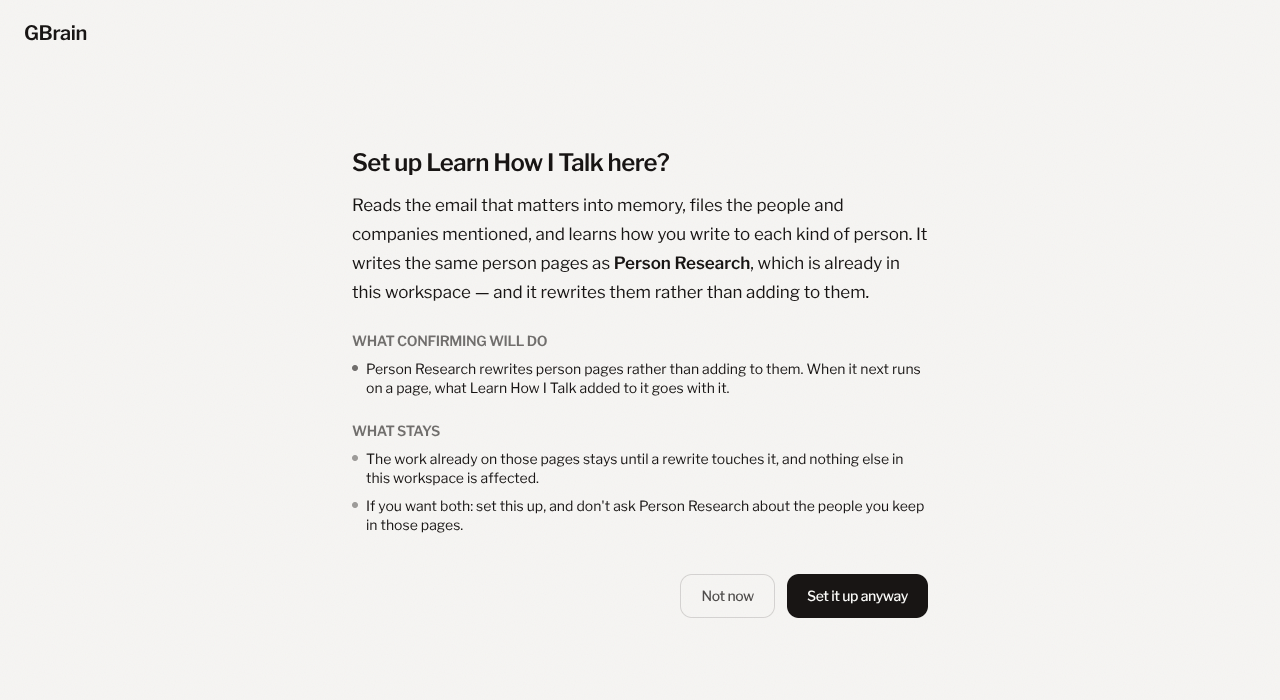
Press Set it up anyway and the skill is set up as usual, in a conversation of its own. Press Not now and nothing changes.
Where the warning comes from
Every skill says which pages it keeps, and which of them it rewrites rather than adds to. That statement is part of the skill, so what the page tells you is read from the skills themselves rather than guessed at from their names.
A warning appears when one side rewrites what the other writes. Two skills that both only add to a page never warn, because they do not get in each other’s way — a warning that fires when nothing is wrong teaches people to click past the ones that matter.
What to do about it
Both skills can usually run in the same workspace, as long as the one that rewrites is not pointed at the same people. The page’s last line says how. Otherwise, keep the one already there, or let the new one take over the pages and accept that what the old one added goes with it.