
Each account a person adds to a GBrain team workspace now has its own answer to who else may use it. When the answer is to ask first, nobody else’s AI uses the account until its owner says yes, on a page that says exactly what the AI would reach.
Whoever connects an account decides who uses it
The problem. One person connects their email to a team workspace, and every AI in it can search that mailbox, pay and HR threads included. At a company of any size, that stops a team from connecting anything.
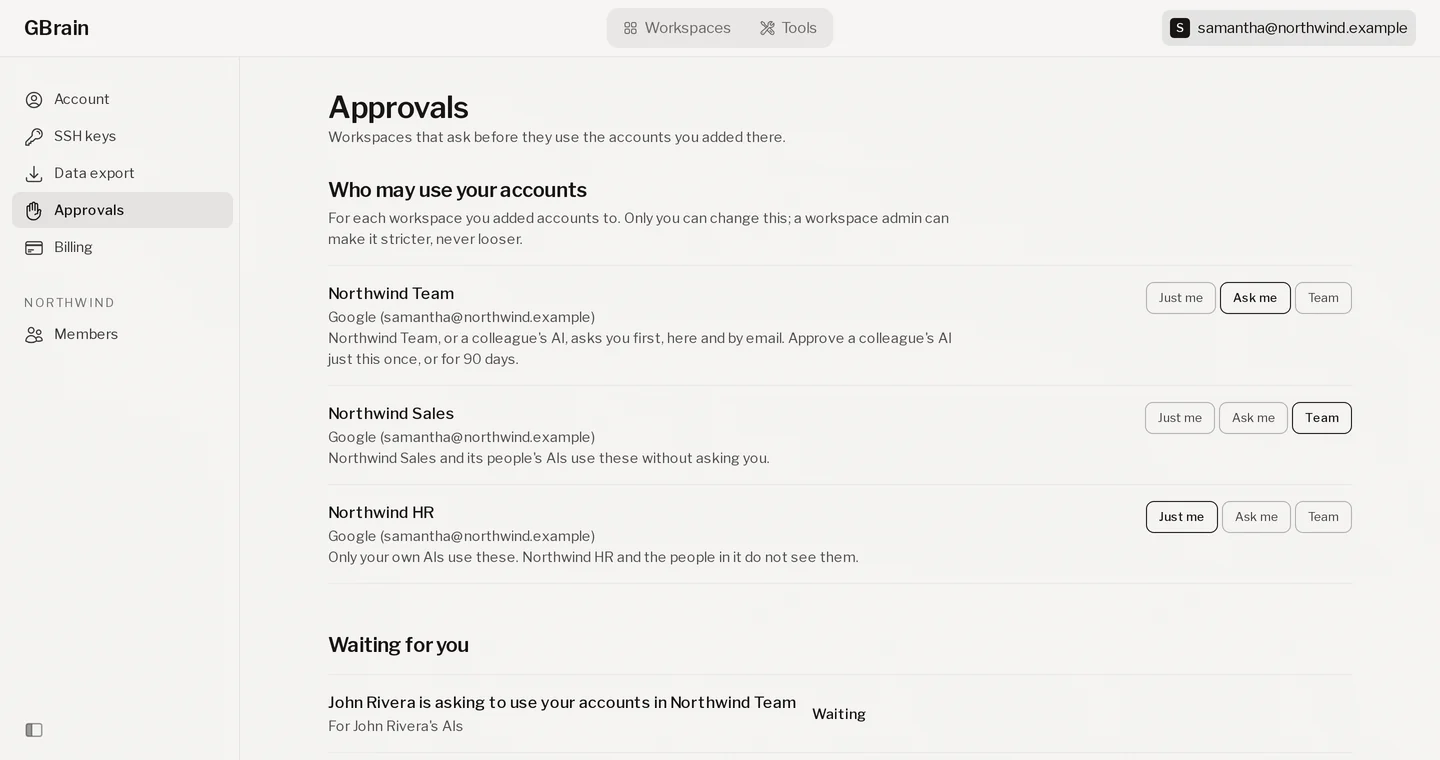
The person who connected the account picks one of three answers, for each workspace:
- Only you can use it. The AIs you use reach the account. The workspace and the people in it don’t see it.
- A teammate’s AI has to ask you first. The workspace’s own AI, or a teammate’s, stops and asks, on the Approvals page and by email. You can let a teammate’s AI through just this once.
- Anyone on the team can use it. The workspace and its people use the account without asking. Every account starts here, as before.
Only the owner changes this. An admin can set a whole workspace to ask first, which makes every account in it stricter and never looser.
The owner can approve a single search
John’s AI needs to find last month’s invoice from a supplier, and the invoice is in Samantha’s email. Her account asks her first, so John’s AI stops and Samantha gets asked: a page with the exact search John’s AI wants to run. She picks Just this once, that one search runs, and the next time John’s AI wants her email it asks again.
The problem. A scheduled team job that reads everyone’s email is fine when each person agreed to it. A colleague typing a new question that searches someone else’s mailbox is not, and the only answers were yes to everything or no.
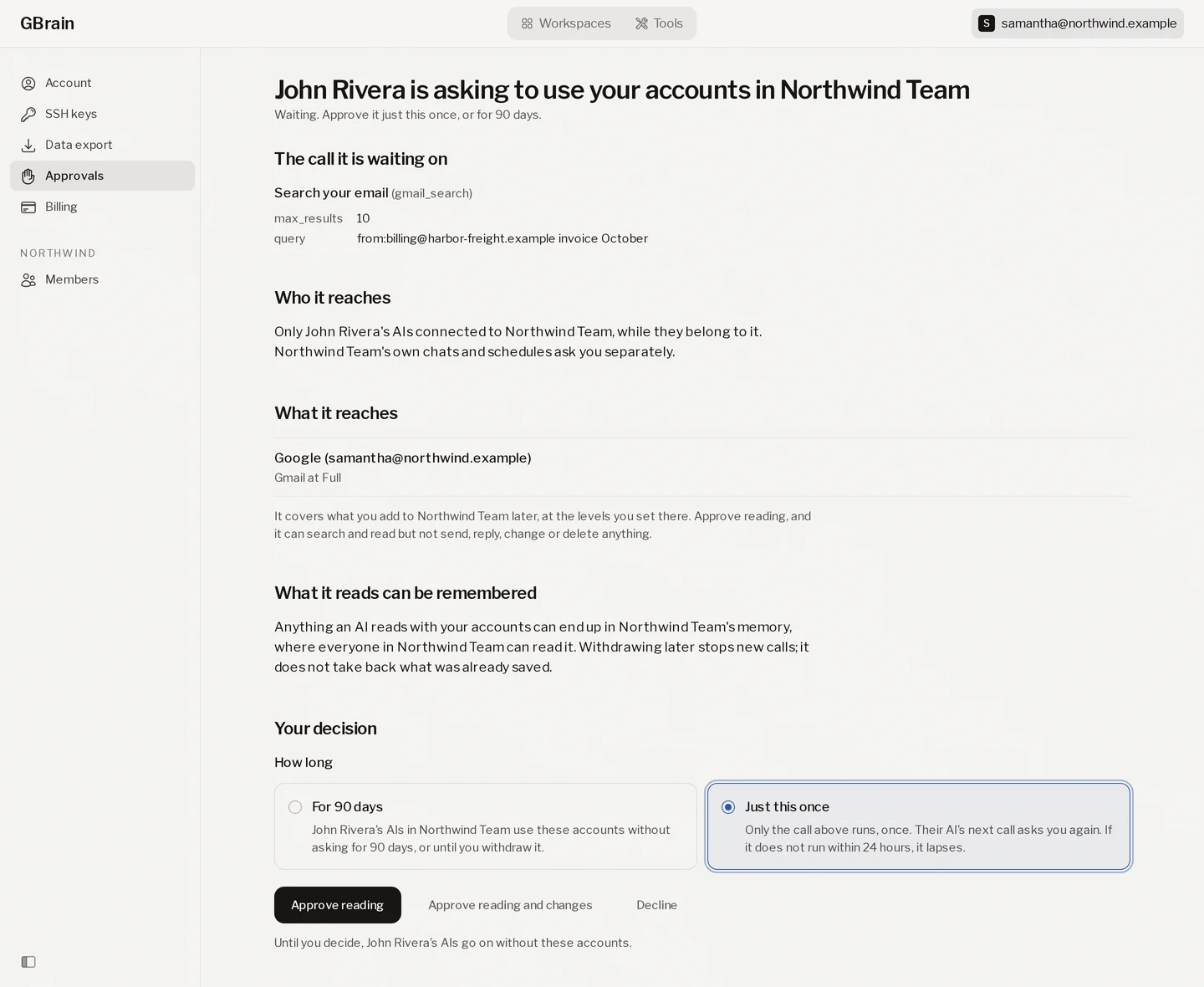
- Just this once. Only the call on the page runs, once. The next call asks again, and an approval that isn’t used within 24 hours lapses.
- For 90 days. That colleague’s AIs use the account without asking for 90 days, or until the owner withdraws it.
- Decline. Their AIs go on without the account.
- Reading, unless the owner says more. Approve reading lets the AI search and read. Sending, replying, changing or deleting takes Approve reading and changes.
- Each colleague asks for themselves. A yes to one colleague is not a yes to another colleague, or to the workspace’s own chats and schedules, which ask separately and are approved for 90 days.
- One link for all of it. gbrain.io/approvals opens the signed-in person’s own Approvals page: what is waiting, and what was decided. Every call made with the account, and every decision, is on the owner’s Activity page.
Two things GBrain doesn’t do yet
- Following each source’s own permissions. A private page in a connected app is read with the full access of the account that connected it. GBrain doesn’t yet check who else that app lets see it.
- A shared account acting as the person who asked. When an owner approves a colleague, the colleague’s AI reads with the owner’s access. Reaching only what the colleague could reach is not built yet.
Since this note, there is a fourth answer: a teammate’s AI uses the teammate’s own account of that kind instead, and sees only what the teammate could. And an admin can review a team’s whole setup on one page and sign off on it. Team setup shows who can read every workspace across the organizations they run.
Next is sending a page from a person’s own workspace to the team’s.
What you need to do
Nothing changes until someone changes it: every account stays open to the team. To choose, open gbrain.io/approvals and pick an answer for each account in each workspace (on that page the answers are called Just me, Each person, Ask me and Team).
The full guide, for whoever sets up a team workspace, is Who may use an account in a team workspace.
The names changed, 2026-11-05
Each account in a workspace carries one of three answers now, and two of them are called something new. Team is Everyone, no approvals needed, Ask me is Everyone, but I approve all requests, and Just me is Only me. Accounts set to Each person now say Only me: that choice ran a colleague’s AI on the colleague’s own copy, and it is gone. An owner who wants a colleague’s AI to reach the account again sets it to Everyone, but I approve all requests, and each use asks them first.
Nothing changes for you unless an account you added was on Each person: that account now answers only your own AIs. Who may use an account in a team workspace has the three answers.